When Slack starts running the whole day
You open Slack to answer one question, then stay there because three more pings arrive before you finish the first reply. That pattern feels productive because you are active all day, but it quietly breaks the parts of your job that need a full stretch of attention. Writing a spec, checking numbers, or fixing a bug usually falls apart when every few minutes brings a new red badge.
The problem is not Slack itself. It is letting arrival time decide importance. In most teams, truly urgent messages are rare, while routine chatter shows up nonstop. If you do not separate those two, Slack stops being a tool and starts setting your schedule.
Which messages actually deserve your immediate attention?
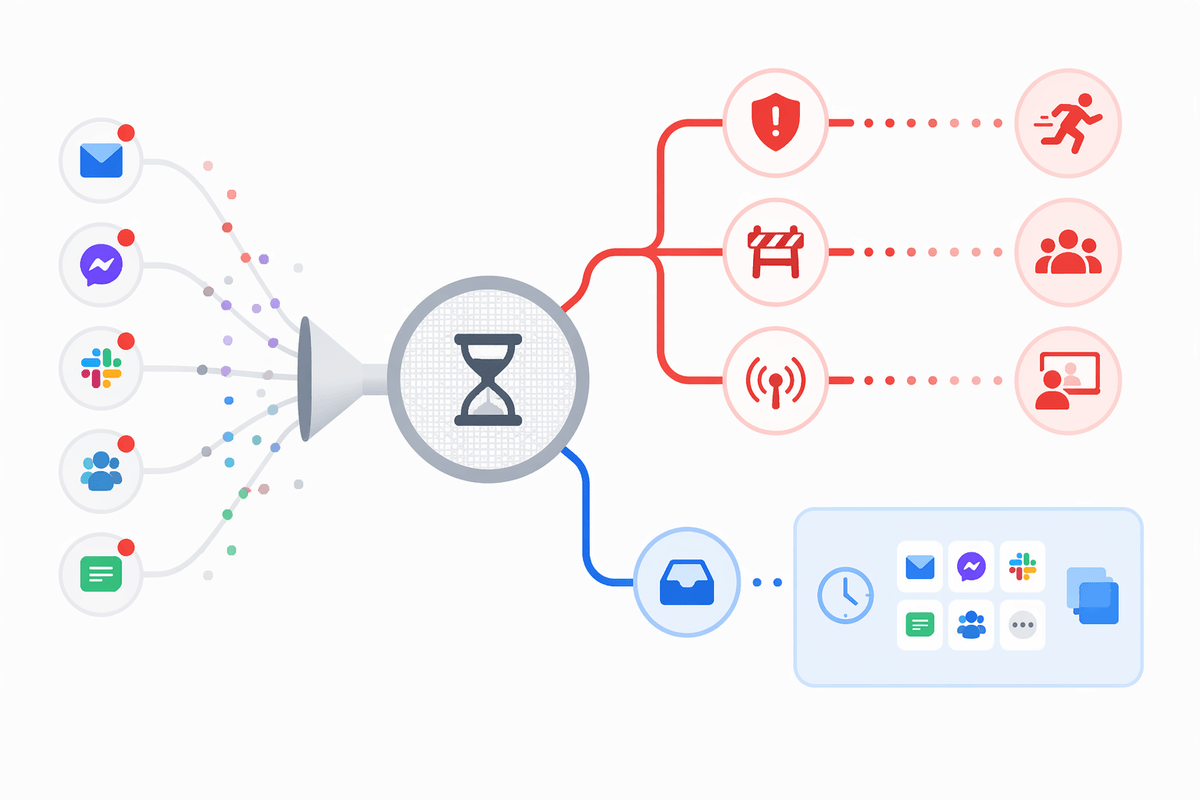
A ping deserves fast attention when delay will block someone, create a real risk, or cause you to miss a live decision. Think of a teammate waiting on one approval to ship a fix, a customer issue that needs facts from you now, or a meeting happening in ten minutes where your answer changes the plan. Those are time-sensitive. Most other messages are not, even when they sound urgent.
A good test is simple: if you reply in an hour instead of three minutes, what actually breaks? If the answer is “nothing important,” it can wait for your next check. Status requests, casual questions, broad channel debates, and messages sent to many people usually fall into that bucket. The hard part is social, not technical. Some coworkers use “quick question” for everything, and Slack makes every notification look equally fresh.
Set your own rule before the next ping arrives: respond fast to blockers, deadlines, and live handoffs; batch the rest. That only works if the noisy rooms stop presenting themselves as emergencies.
Mute the rooms where urgency is mostly pretend
You can usually spot these channels by what happens after you miss an hour. Nothing breaks. The thread keeps going, people answer each other, and the messages that looked urgent at 10:12 are old news by lunch. That is a sign to mute the channel, leave badge counts off, or switch it to mentions only. Team social rooms, broad project channels, and announcement spaces often belong here even when they generate constant activity.
This is not avoiding work. It is separating broadcast traffic from messages that actually need you. If a room matters but rarely needs your direct input, keep it available without letting it interrupt you all day. The practical snag is social pressure: some teams treat instant visibility as a sign of commitment. If that is your culture, mute quietly and stay reliable where it counts by answering direct questions, key project channels, and true blockers fast.
Once the fake emergencies stop flashing, the next problem gets harder to ignore: saving messages is not the same as having a real way to track them.
A saved message is not a real system
You star or save a Slack message because you cannot deal with it right now. That helps for about ten minutes. By the end of the day, the saved list turns into a mixed pile of requests, reminders, links, and half-decided tasks. Nothing in that pile tells you what matters first, who is waiting, or when you need to act.
A real system does that sorting for you. If a message creates work, move it out of Slack into the place where you already track work: your task list, ticket queue, calendar, or notes for the current project. Add one plain next step. “Review draft by 3 p.m.” is usable. “Follow up later” is not. If the message only matters for reference, file the link and let it stop taking up attention.
The catch is speed. People keep things in Slack because moving them feels like extra work. It is extra work, but less than rereading the same saved message five times and still forgetting it. Once action items leave the chat stream, you can decide how available you really need to be.
Can people reach you without constant availability?

You block off ninety minutes to finish something important, and ten minutes in you start wondering, “What if someone needs me?” That fear keeps people half-monitoring Slack all day. In most teams, the fix is not full availability. It is giving people a clear path for the few cases that really cannot wait. If urgent means “DM me and mark it urgent,” say that. If it means “text me only for production issues or live client problems,” say that instead.
What matters is making the rule specific enough that people can use it without guessing. “Reach out if needed” is vague, so coworkers default to pinging you for everything. “I check Slack at 10, 1, and 4; if you are blocked on today’s deadline, call me” is much easier to follow. That kind of boundary still keeps work moving, but it stops routine questions from cutting your day into scraps.
There is a social cost at first. A few people will assume slower chat replies mean lower support. You fix that by being predictable, not by hovering in Slack. When others know how to reach you and when to expect a response, availability turns from constant presence into a working agreement. That makes scheduled checking actually hold.
What should you check on a schedule instead?
If you stop watching Slack live, you still need a short list of things to review on purpose. Most people do well with three kinds of checks: direct messages, mentions in priority channels, and updates tied to work due today. That might mean scanning your DMs, looking at two project channels where decisions land, and checking your task board or ticket queue right after. The point is to catch real work in batches instead of letting random arrivals set the pace.
Put those checks on the calendar if needed. A ten-minute pass at 10:00 a.m., 1:00 p.m., and 4:00 p.m. is often enough for office jobs that feel chat-heavy but are not true emergency roles. You may need one extra check during a launch, handoff, or deadline day. Keep it narrow. If you open every channel each time, the routine collapses and you are back in the stream.
That structure works best when replies stay useful and brief, because speed does not come from reacting more often.
You need fewer reactions, not less collaboration
You can stay easy to work with without answering every message the moment it lands. Collaboration usually improves when people get clear replies, clear owners, and clear next steps instead of a trail of fast reactions. A short answer that names the decision, deadline, or handoff does more than five scattered check-ins.
That also cuts a common problem: chat can create the feeling of movement while the real work stalls. If a thread needs a decision, make one. If it needs work, turn it into a task. If it only needs acknowledgment, keep it brief and move on. Judge your Slack habits by whether work keeps moving, not by how quickly you can twitch back.